Edition #09 introduced the private-transfer beta and our new wallet repository. Since then, we have continued making the website easier to use: a personal profile page, clearer incoming and outgoing transfers, more Monero wallet controls, and a refreshed view of tokens and their supply.
The aim remains the same: make it straightforward to hold, move and use XMR20 tokens on native Monero. This edition brings together the website improvements published since the last update, alongside the latest wallet code and automated checks available on GitHub.
A new home for your wallet
29 October
Your XMR20 wallet now has a home of its own. The new profile page brings Portfolio, Wallet and Activity together, so you can move from an overview of your holdings to the wallet controls without leaving the same page.
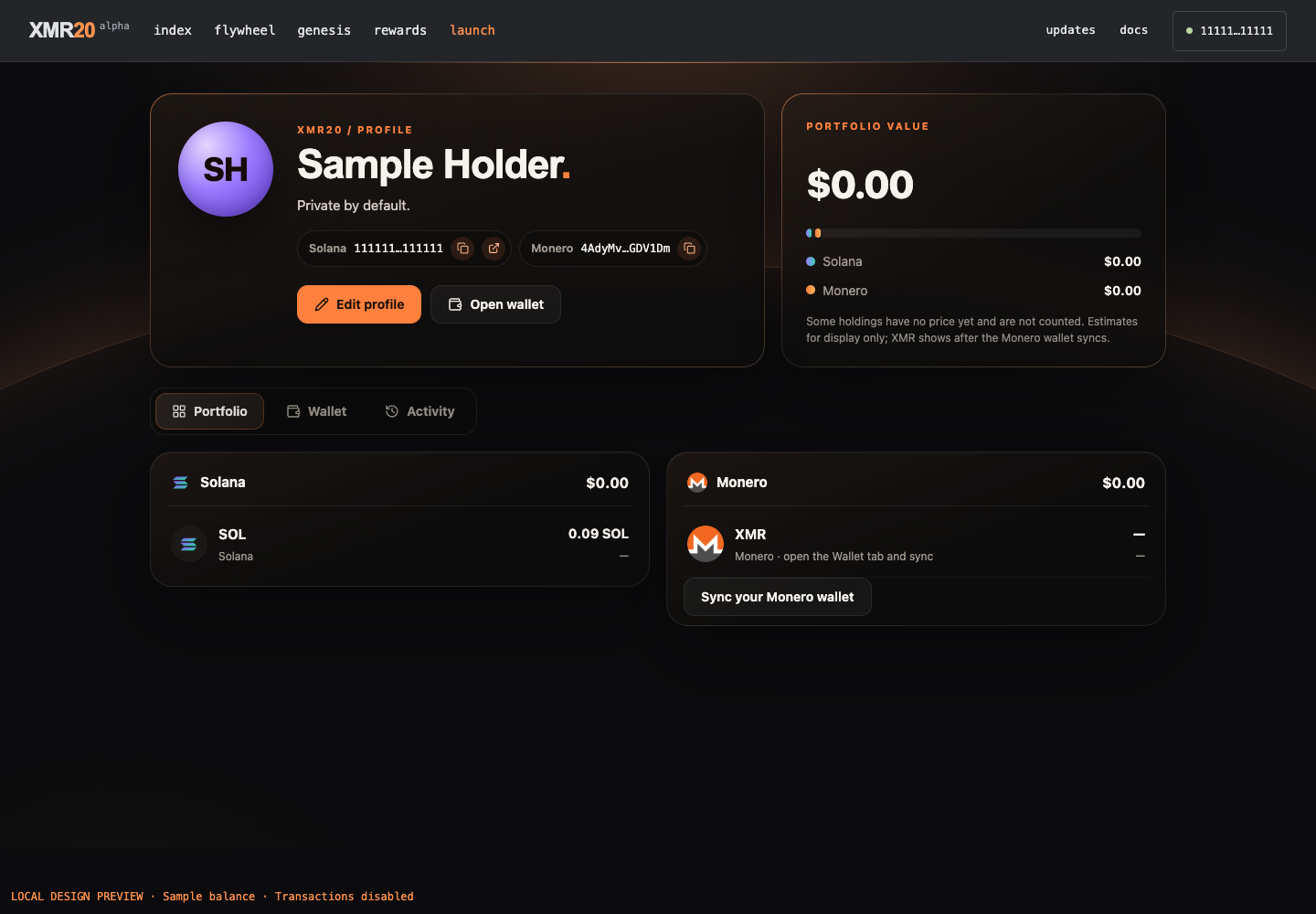
A saved design preview using sample addresses and balances, with transactions disabled. It illustrates the profile layout; it is not a real holder account or a live balance report.
Portfolio brings Solana and Monero holdings into one view, including Open and Private XMR20 balances when your wallet is synchronized. USD estimates are shown where prices are available. The Wallet tab places the Solana and Monero panels side by side, while Activity brings together activity recorded on this device.
You can give the profile a name, a short bio and a colour. These choices are saved in your browser. The connected-wallet button also has a new menu with My profile, Open wallet, Copy address and Disconnect, making it easier to move around the website.
This first version is a personal space on your device. Profile details and the activity view are local to that browser.
What we checked
The profile and wallet-menu release is live. Its publication checks matched 85 deployed files, and the disconnected profile entry was checked at desktop and phone widths. The connected layout was exercised using sample wallet data.
Follow a transfer as it arrives
28–29 October
Private transfers are already part of the beta. We have continued building the experience around them, giving both sides of a transfer a clearer view of what is happening.
An incoming token transfer can now appear as Pending, then move to Confirming n/10 as it gains Monero confirmations. Labels such as Received privately, Received and Arriving from Solana explain where the tokens are coming from. Before a transfer is included in a block, it appears as Pending rather than being added to the balance. Confirming n/10 then shows its confirmation progress.
On the sending side, the outgoing amount is reserved straight away and shown in a compact pending row. That makes it easier to see which tokens are available while a transfer is completing.
Normal and Private receiving addresses now sit together in the wallet header, with copy controls for each. The wallet also continues from saved scan progress and updates its progress display as it reads token history. Together, these changes make returning to the wallet and following a transfer more straightforward.
What we checked
The incoming-transfer interface is deployed on the website. The recorded checks include real-engine tests on an offline simulated chain, eight pending-display checks, 576 extension unit tests and 131 website unit tests. These validate the interface and state handling; they are not a claim of a funded incoming private-transfer test through this new display.
More of your XMR wallet in one screen
28–29 October
Tap Monero in the wallet to open a dedicated screen with Send, Split and Bridge, followed by your receiving address and a Copy button. The controls now sit together with the balance they act on.
Split lets you prepare between two and sixteen separate XMR coins in your own wallet. These are Monero outputs: separate pieces of XMR that can pay for later transactions once confirmed. Preparing several in advance can make repeated token operations more convenient. Splitting is a transaction to yourself, with a normal network fee and confirmation wait.
The Bridge menu now offers two named routes: wXMR on Solana through wxmr.io, and SOL through ChangeNOW. The wXMR interface includes both wrapping and redemption, while the SOL option provides a quoted exchange route. These routes connect native XMR with Solana assets; they are separate from bridging an XMR20 token balance.
Each route keeps its provider, amounts and approvals visible. wXMR uses its own wrapping arrangements, and ChangeNOW is a third-party exchange with its own quote and fees.
What we checked
The Monero screen, splitting controls and bridge choices are included in the live website release. Recorded checks cover the interfaces, read-only mainnet program data and a simulated wXMR withdrawal. The new wXMR integration has not yet been verified with a completed funded deposit or withdrawal.
A clearer view of tokens and their supply
28–29 October
The token page and Supply & holders page now share the website’s refreshed design. Token information, charts and trading controls sit in clearer panels, while the holder view makes it easier to understand where a token’s supply is represented.
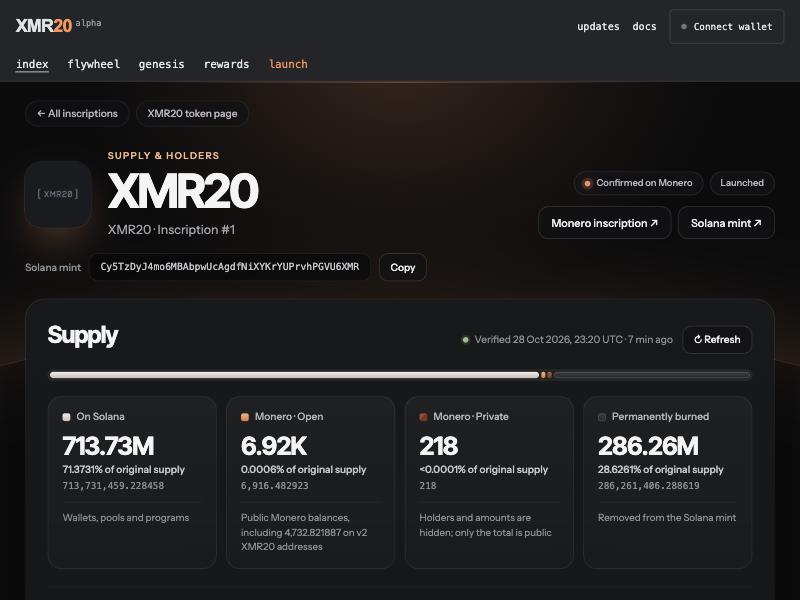
Saved from the public XMR20 page during the 28 October release check, with no wallet connected. The figures are a historical screenshot, not current supply or price data.
A supply bar and separate totals show the Solana side alongside Monero Open and Monero Private balances. Confirmed bridge backing is counted once, rather than treating the vault as another holder. The private side is represented in aggregate, so the page can show the total without exposing individual private holders.
Filters, search and a Refresh control make the holder view easier to explore. On smaller screens, rows become compact cards. Holder coverage has also expanded to include confirmed tokens launched through the project’s tweet-launch flow.
Public Monero Open and Private figures are totals for the current system. They should not be read as a directory of individual private owners.
What we checked
The token and holder redesign passed 44 deployed-file comparisons, with desktop and phone layout checks. The current website retains those files. The public display uses aggregate Monero totals and does not enumerate private holders.
Practical guides for the wallet you use
29 October
We have rewritten the documentation around practical wallet tasks. The new guides walk through setup, backup and restore, receiving and sending XMR, splitting coins, bridging tokens in both directions, and sending Open or Private tokens on Monero.
The instructions use the button names you see in the wallet and explain what you need before each step. Normal and Private receiving addresses, pending transfers and the difference between bridging tokens and preparing XMR are covered in plain language.
The protocol reference and interactive inscription example remain available for readers who want to go deeper. The result is a clearer route from understanding XMR20 to using the wallet.
What we checked
The documentation rewrite is live and passed 38 deployed-file comparisons. Its release included desktop and phone checks, and the current website release preserves both the new content and its guide styling.
More wallet code, with checks you can follow
28–29 October
Since introducing xmr20-wallets in Edition #09, we have continued putting the wallet work into public review. The latest changes cover incoming-transfer progress, preparing XMR for several transactions, pending balances and faster private-transfer preparation.
GitHub now runs automated tests for the shared engine, extension and CLI, checks the CLI engine offline, and builds the extension, website wallet and CLI package. The latest incoming-transfer review passed every workflow step, with the results linked below.
Developers can inspect the implementation, follow the checks and use the shared code as a starting point for compatible XMR20 wallets. The current additions are in open review pull requests; they are development source rather than an announced ready-made download release.
What we checked
The incoming-transfer review at commit e99ddb6 passed GitHub’s test-and-build workflow on 29 October. The public repository still has open draft pull requests and no published download release at the time of this draft. Automated checks are evidence of the tested code, not an independent security audit.
Evidence & release status
This edition covers work recorded after Edition #09 on 28–29 October. The profile, wallet controls, incoming-transfer display, token pages and rewritten guides are deployed on the website; private-transfer functionality remains in beta. Evidence combines release-file comparisons, interface checks and scoped engine tests. Incoming-private display tests used an offline chain, and the new wXMR route has read-only, simulation and interface coverage rather than a completed funded transfer. Profile preferences and Activity are browser-local. The profile image uses sample data, and the supply image is dated release evidence. Public wallet changes remain in review branches; passing automation is not an independent audit.
| Workstream | Recorded state |
|---|---|
| Your profile | Live on xmr20.org |
| Transfer progress | Live · beta |
| Monero wallet | New controls live · beta |
| Token pages | Live across supported tokens |
| Wallet guides | Live in Docs |
| Open development | Public review · checks passing |
What comes next
The website is becoming a more complete place to use XMR20: connect, see your holdings, follow a transfer and find the right guide. We will keep building on that experience and sharing the work openly as the wallet beta develops.
Back to all updates