Since our last community update, we have brought the XMR20 transaction explorer directly into the website. The new Explorer tab sits beside Updates and Docs, giving the community a straightforward way to follow public token activity on Monero.
Edition 14 introduced more wallet choices. This edition is about making the activity behind those tools easier to inspect: from a searchable overview to an individual transaction, with clear links back to the blockchain.
A home for XMR20 activity on Monero
Since Edition 14 · 2–3 November
Open the Explorer to see a summary of indexed activity and a list of public records. It brings together the token activity feed, the token launch catalog and the NFT reader, so you can browse several parts of the ecosystem from the same page.
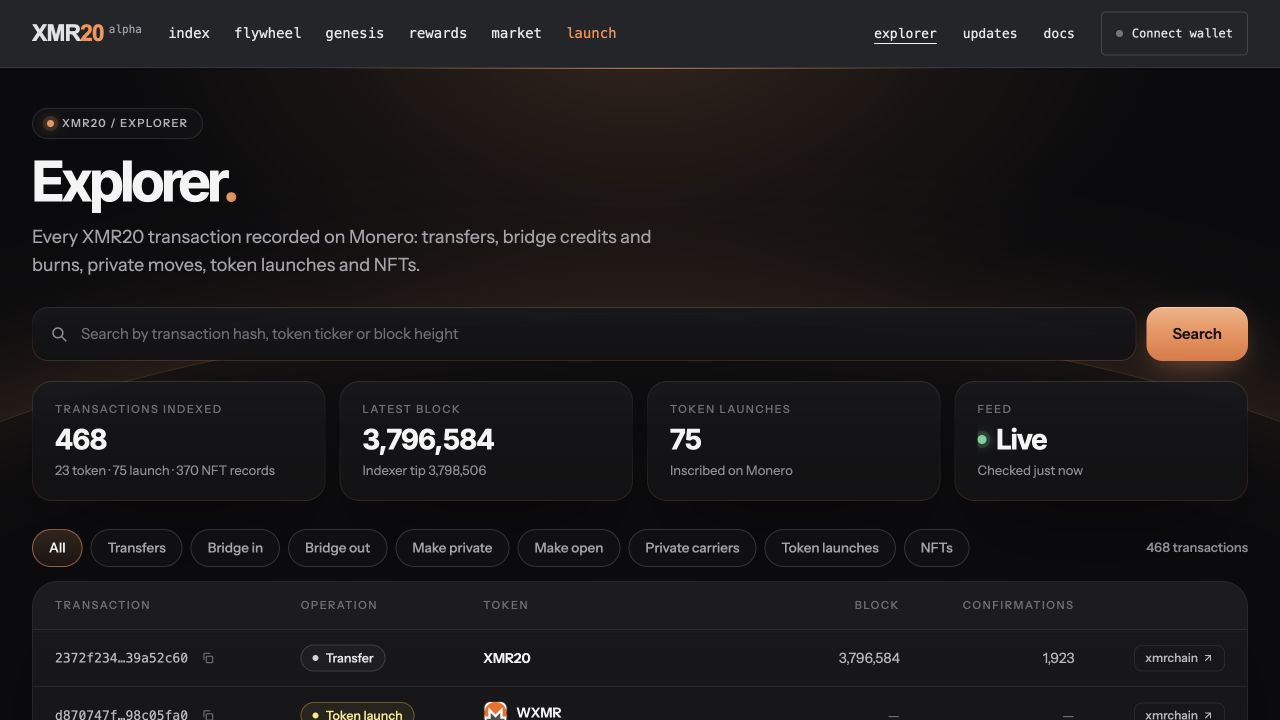
Captured from the live website on 3 November. Counts and confirmations reflect that moment; this is a view of existing indexed records.
The operation filters cover transfers, bridge in and out, moves into and out of the private format, private carriers, token launches and NFTs. The NFT view includes collection launches, mints and each NFT's latest indexed transfer.
During our 3 November check, the page displayed 468 indexed records: 23 from the token activity feed, 75 launch records and 370 NFT records. Those are the records available to this view at the time of the check, rather than a measure of new activity since the last edition.
The summary cards show the latest indexed activity block, token launch count and feed status. The page refreshes every minute while it is visible, making it useful both for a quick look and for following the available feed over time.
What we checked
The live Explorer loaded its combined record list and displayed a Live feed during review on 3 November. The public activity endpoint returned the indexed token records. The release records also confirm that the new page and its data route were checked before and after publication.
From a search to the transaction behind it
Since Edition 14 · 2–3 November
You can search by transaction hash, token ticker or block height, then narrow the results with an operation filter. The list is split into pages of 25 records, with copy controls for transaction hashes and a direct link to xmrchain.net.
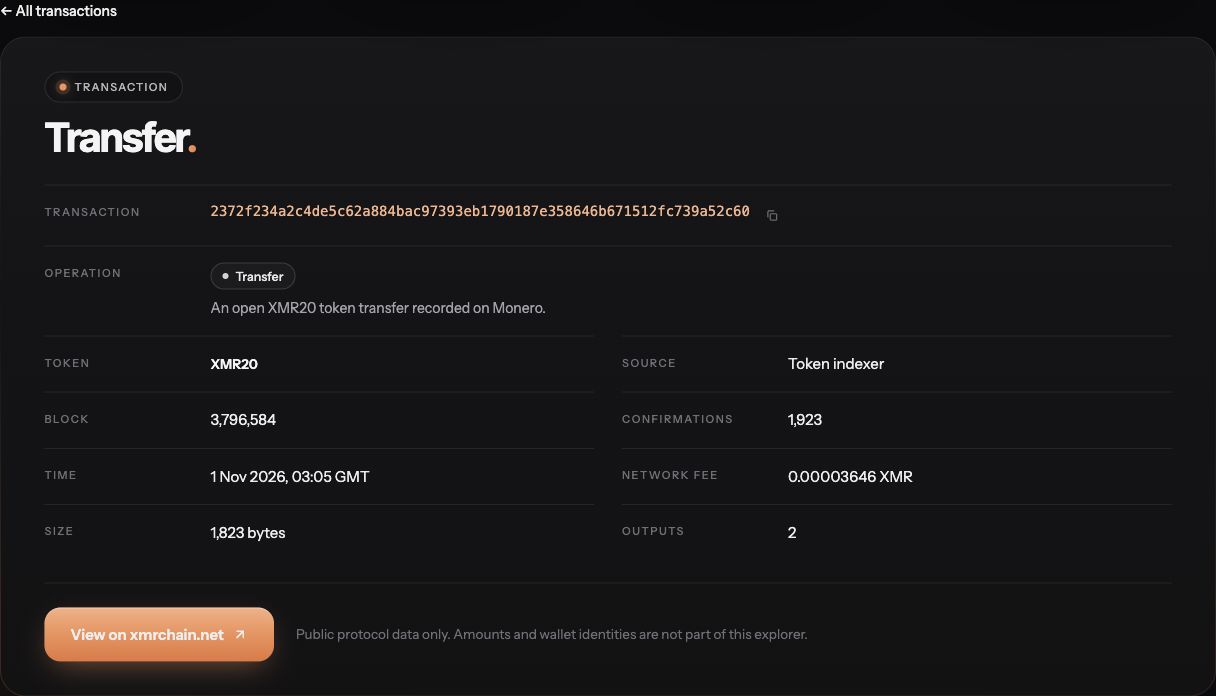
The Explorer's detail page for an existing Open XMR20 transfer, captured on 3 November. Only public chain information is shown.
Clicking a transaction opens its own detail page. It explains the operation and shows the record's source, block and confirmations where available. A public Monero explorer supplies additional chain details such as block time, network fee, transaction size and output count.
For a simple example, we selected Transfers and searched for block 3796584. That found an existing Open XMR20 transfer. Opening it displayed the transaction's chain details and its external explorer link, all without connecting a wallet.
Each transaction page has a shareable URL. That makes it easier to point someone to a specific record when discussing activity, documenting a test or checking a transaction. The fee shown is the Monero network fee; it is separate from the token amount, which this explorer does not display.
What we checked
The Transfers filter and block search were exercised on the live page. The linked example loaded block 3,796,584, its block time, a 0.00003646 XMR network fee, a 1,823-byte size and two outputs. This is a previously recorded transaction used to demonstrate the Explorer, not a new transfer submitted for this update.
Part of the website, on desktop and mobile
Since Edition 14 · 2–3 November
The Explorer uses the same dark background, orange accents and card styling as Updates and Docs. Its place in the header makes it easy to move between the market, the guides and the public activity record.
The navigation link is present across the live site, including the market, launch page and previous community updates. On smaller screens, the transaction table becomes a set of readable cards, keeping the hash, operation, available block information and chain link together.
The existing inscriptions and NFT explorer remains available too. The new website page adds a convenient transaction view to xmr20.org, while the separate explorer continues to provide its archive and browsing tools.
What we checked
The live header shows Explorer before Updates and Docs. The recorded release checks covered navigation, search, filters, transaction pages and back navigation at desktop, tablet and phone widths. This edition keeps the same Updates design and the new Explorer link.
See the record while private contents stay private
Explorer design
The activity list focuses on public facts: transaction hashes, operation types, blocks and confirmations. Token amounts and wallet identities are left out of the Explorer interface. Reading the page does not require a wallet connection, recovery phrase or viewing key.
A Private carrier entry means the index has recognised a transaction carrying private-token data. It does not decrypt the transfer or reveal the contents of its encrypted notes. Several carriers can be part of one transfer, so the number of carrier rows is not a count of separate private transfers.
The distinction between Open and Private tokens still matters. Leaving a field out of the Explorer is a presentation choice; it does not turn an Open token record into an encrypted one. Private transfer contents remain protected by the token protocol rather than by the page hiding a column.
The About this data section explains where the records come from and how to interpret them. For example, a bridge-out entry records the Monero side of that operation; it is not by itself proof of a Solana payout. This gives readers useful public evidence with the context needed to understand it.
What we checked
The live activity response contains only transaction ID, operation, height and confirmations for each token-feed row. The website's list and detail view omit token amounts and wallet identities. The source and About section explicitly describe private carriers and the feed's coverage.
Evidence & release status
This edition covers the Explorer work released after Edition 14 and reviewed on 3 November 2026. It draws on direct Claude development records, relevant Codex chats, release evidence and read-only checks of the live website. The screenshots show existing public records; no wallet was connected and no transaction was submitted. The combined count is a dated snapshot of the available sources, not a claim of complete transaction history. Earlier wallet and GitHub releases remain covered in Edition 14.
| Workstream | Recorded state |
|---|---|
| The new Explorer | Live on xmr20.org |
| Search and transaction details | Search, filters and detail pages live |
| Website experience | Shared navigation and responsive layout live |
| Public records and privacy | Public activity with clear data boundaries |
What comes next
More wallet choices make XMR20 easier to use. A built-in Explorer makes its public activity easier to follow. Together with the market and guides, it gives the community a clearer path from using native Monero tokens to inspecting the records behind them.
Back to all updates